Why Furniture and Labels Can Confuse Wall Detection
Furniture symbols can help a person understand a room while making automatic wall extraction more ambiguous. A dark sofa outline, table edge, or patterned…
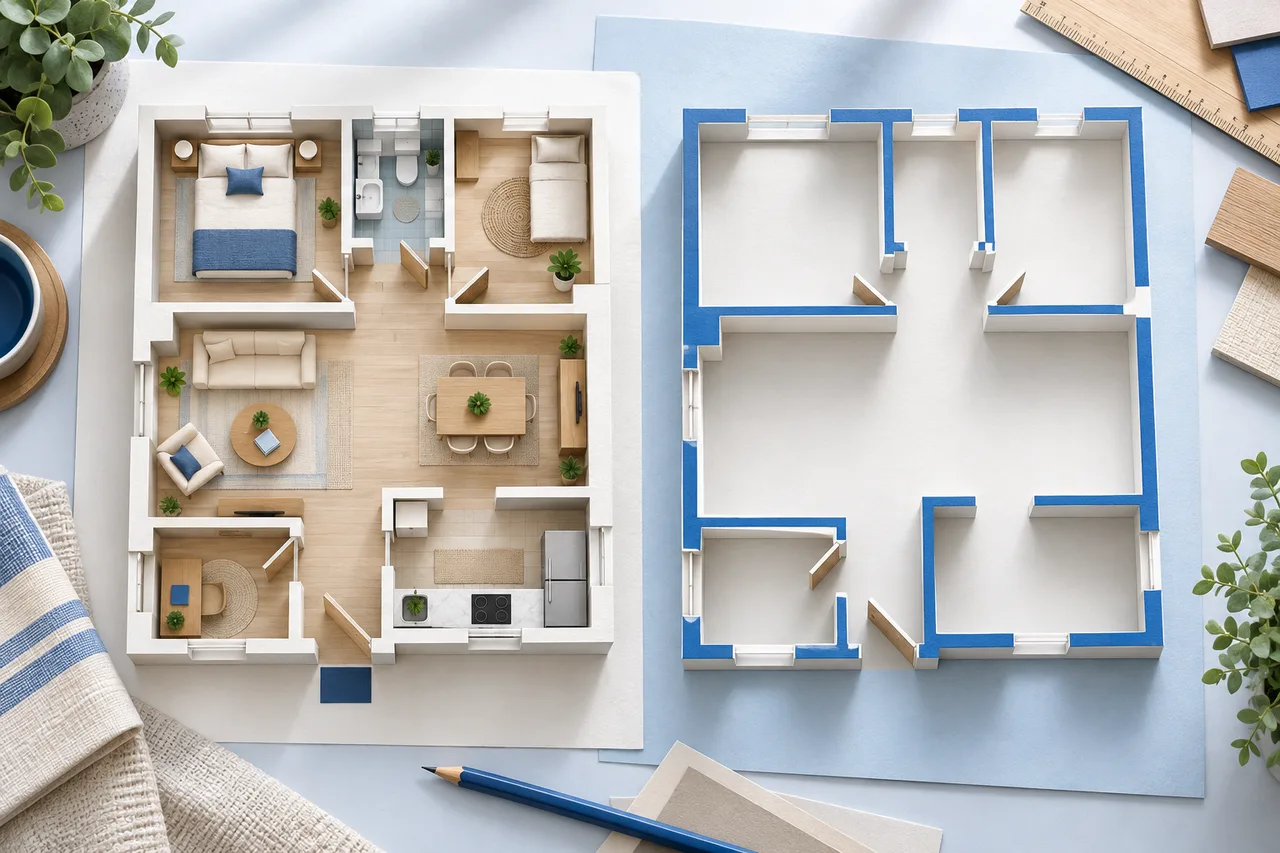
Furniture symbols can help a person understand a room while making automatic wall extraction more ambiguous. A dark sofa outline, table edge, or patterned bed can resemble a small enclosure. A wall-focused upload copy can reduce that ambiguity without changing the original drawing.
The best method depends on whether you have editable drawing layers or only a flattened image. Keep an annotated reference alongside the cleaned copy so dimensions and room context are not lost.
Use layers when they are available
If the original drawing application has separate furniture, annotation, and wall layers, hide the unnecessary layers before exporting a copy. Check that doors and wall boundaries have not been grouped into the same hidden layer. Layer names are helpful, but the visible result is the real check.
Export one floor at a time. Preserve the full exterior boundary and enough margin to see all corners. Removing furniture should not also remove a wall behind a built-in unit or a partition next to a cabinet.
Work carefully with a flattened image
A JPG or PNG may combine every line into one image. In that case, erasing furniture is a local image-editing task. Remove only shapes you can confidently identify, and compare the area with the original before accepting the edit.
Suppose a bed symbol touches an internal wall. Erasing a large rectangle around the bed could remove part of that wall. A cleaner-looking white patch would then create a missing-wall problem. Zoom in and preserve the actual boundary, or use a better source rather than guessing.
Keep openings and fixed features distinguishable
Door swing arcs, window symbols, stairs, and fixtures are not interchangeable with loose furniture. Even if the converter does not reconstruct them as complete objects, they remain useful references when reviewing the result.
Do not automatically erase every curved line. A curve might be furniture, a door swing, or a curved wall. Use the drawing legend and surrounding context. Where the meaning remains uncertain, keep a separate marked reference for human review.
Compare detection rather than appearance alone
Convert both the original and the wall-focused copy if you need to understand the effect of cleanup. Compare the 2D wall footprints, not just the attractiveness of the 3D view. Check whether false partitions disappeared and whether real walls remained intact.
A stripped drawing can still contain heavy room labels, dimension strings, or hatching that joins the wall mask. Furniture removal is one preparation step, not a guarantee that the remaining linework will be interpreted correctly.
Keep a clear file pair
Use names that distinguish the reference from the upload copy, such as ground-floor-original.pdf and ground-floor-walls.png. Store the known measurement used for scale with them. If a colleague needs room names or furniture context, share the annotated original as well as the model.
The upload preparation checklist covers the rest of the input review. Once the walls are suitable, the room layout planner can help you explore new furniture arrangements as separate measured footprints.