Real Estate 3D Floor Plans: Rendering Briefs, Services and Honest Deliverables
Commission real estate 3D floor plans with a practical brief: compare image and model deliverables, review accuracy, manage revisions and label staging clearly.
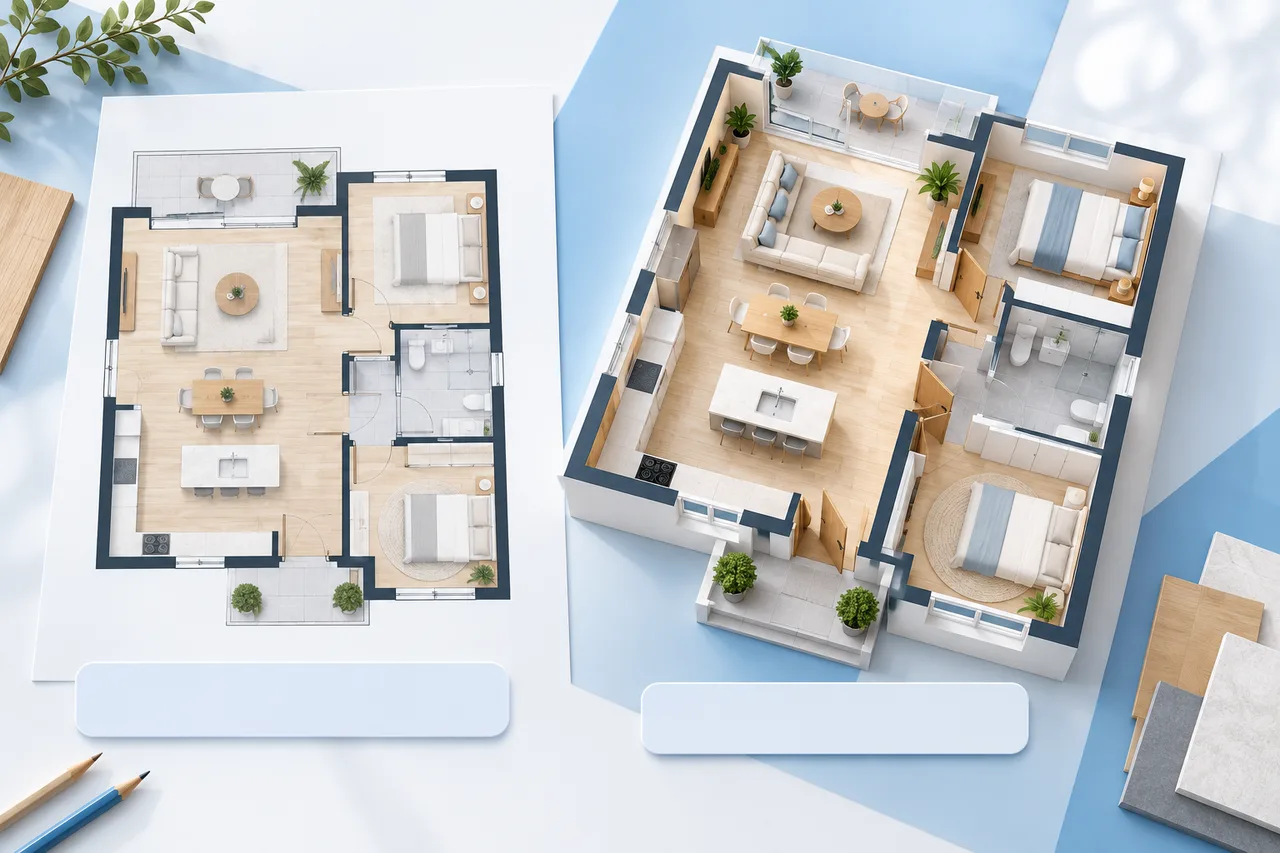
A real estate 3D floor plan should help a buyer understand the property before a viewing. It can explain how rooms connect, how furniture might fit and where an entrance leads. It becomes misleading when a polished image quietly changes the building or makes uncertain measurements look exact.
Before choosing a rendering company, decide what question the output must answer. A listing image, an editable model and a measured floor plan are different deliverables. Buying one does not automatically provide the others, even when the proposal describes them all as “3D plans.”
This guide sets out a practical commissioning brief and a repeatable review process. The example property and production choices are fictional; they are a framework for comparing quotations, not claims about a particular provider's prices or performance.
Name the deliverable before requesting a quote
For a listing, you may need a rendered floor plan drawing: a static image showing walls, openings, room labels and suggested furniture. An editable model instead contains geometry that someone can change in compatible software. A measured plan records dimensions and a stated measurement basis.
These differences affect cost, review and future use. A JPG cannot provide editable walls. A model exported as a mesh may not preserve architectural objects. A convincingly rendered house plan is not proof that its dimensions were checked on site.
Our GLB, OBJ and STL comparison explains why model formats serve different purposes. Use it to frame a specific request, then ask the provider which file types, units and assets will actually be delivered. Do not assume a format named in marketing is included in every service package.
Separate the three meanings of accuracy
First, there is source accuracy: how well the original plan describes the property. Second, there is modeling accuracy: whether the model follows that source. Third, there is presentation accuracy: whether the view, furniture and labels communicate the result honestly.
A provider can reproduce an inaccurate source perfectly. Conversely, a good source can be misinterpreted during tracing. Keep these review stages separate. Identify who measures, who models and who approves the final public image.
If a listing needs a stated floor area, ask the responsible qualified professional for the relevant measurement convention and the underlying record. Do not derive a marketable area by counting colored pixels in a rendering. Gross area, usable area and other measurement categories can differ; record the actual basis instead of choosing whichever number appears larger.
Build an input pack that reduces guessing
Send one clearly named current plan, a revision date and a list of known discrepancies. If photographs are included, explain which room each one shows. Mark north and the main entrance where known. Identify walls, openings and fixed elements that are uncertain.
For a scanned plan, keep a readable dimension and avoid cropping away information needed to establish scale. The upload preparation guide covers basic source cleanup. A cleaner source helps interpretation, but sharpening or tracing cannot create measurements that were never recorded.
State what the provider should do when information conflicts. A useful instruction is: stop and flag a disagreement between a dimension and a photograph. A poor instruction is: make it look right. The second shifts an unresolved factual question into a visual decision that a future buyer cannot see.
Write a brief around one fictional property
Consider a fictional single-level apartment with two bedrooms, one bathroom and an open living and kitchen space. The source pack contains a dated dimensioned plan and room photographs. The assignment is to communicate circulation and possible furnishing, not propose renovations.
A clear brief could read:
Prepare one overhead furnished image and one unfurnished image from the supplied approved source. Keep all walls, windows and doors in their recorded positions. Use the provided furniture dimensions. Flag missing dimensions before modeling. Add an agreed illustrative-staging note to the furnished version.
Then specify outputs. For example, request a 2400-pixel-wide web image plus a separate clean export without branding if needed. Those are example production requirements, not a universal resolution standard. Ask whether source models, textures and fonts are included, and whether the buyer can legally reuse them.
Make the furniture brief measurable
Furniture tells a story about how a room could work. It can also distort scale. Use actual dimensions for the key pieces: bed, sofa, dining table, wardrobes and desk. Decide whether those objects represent existing furnishings or illustrative staging.
Suppose the fictional living room measures 4.2 m by 3.8 m, or 15.96 m². A 2.1 m by 0.9 m sofa occupies 1.89 m² of footprint. That arithmetic does not tell you whether the room functions: doors, circulation, radiator positions and other furniture still matter.
Ask for a top view that shows the whole room. Avoid reducing a bed's width or shortening a sofa to create more apparent space. Keep any supplied furniture schedule with the approval record so that later revisions can be compared consistently.
Compare services on scope, not attractive thumbnails
When reviewing 3D floor plan design services, ask every shortlisted provider the same questions. What source do they require? What do they verify? How many views and revisions are included? What happens when the supplied plan changes? Who retains the editable file?
A comparison table prevents an incomplete quotation from appearing cheaper merely because it omits work:
| Brief item | What a comparable quote should clarify |
|---|---|
| Modeling scope | Floors, rooms, openings and fixed objects included |
| Images | Number of views, dimensions and file formats |
| Revisions | Included rounds and what counts as a source change |
| Editable files | Format, software requirements and asset rights |
| Review | Responsibility for geometry and public claims |
| Reuse | Listing, print, social and future editing permissions |
Do not infer technical quality from a “premium” label. Ask for an example deliverable relevant to your project and inspect what can actually be read or edited.
Review geometry before materials
The first review should be a plain overhead view. Check the entrance, room sequence, wall positions, window locations and door swings against the approved source. Look at bathrooms and kitchens carefully because fixed elements strongly affect how the property is understood.
Mark comments in one consolidated document. “Bedroom window is 0.4 m too far from the corner relative to source revision B” gives a clearer instruction than “bedroom feels wrong.” Where dimensions are missing, record the uncertainty rather than inventing a correction.
Once geometry is agreed, review materials and furnishings separately. This creates a useful approval boundary: changing a wall after the geometry stage is materially different from changing a cushion. Ask the provider to preserve earlier versions so that unintended changes remain visible.
Keep staging truthful and visible
Real estate 3D floor plan rendering often uses furniture and finishes that are not present in the property. Explain this clearly on the output or in its immediate published context. Agree the wording and presentation with the responsible listing professional, taking account of applicable local advertising rules.
Do not remove a structural column, enlarge an opening or replace a restricted view simply to improve the image. A proposed alteration needs a separate, clearly identified concept rather than being blended into the existing-property plan.
If you want multiple furnishing options, hold the building geometry constant. The property presentation guide can help organize the images into a readable set. Every image should make it easy to distinguish the property as documented from an illustrative arrangement.
Confirm image and model rights explicitly
Public availability is not a reuse license. Plans, photographs, furniture models, textures and the final illustration can involve different rights. Request permission for the intended uses and ask whether editable assets carry restrictions when transferred.
The U.S. Copyright Office's introduction explains that copyright can apply to architectural works, photographs and illustrations. Its jurisdiction is the United States; local legal questions require relevant advice. The practical commissioning lesson is to document permissions rather than assume payment or download access settles every right.
Include confidentiality terms appropriate to the source material. Before sharing a residential plan, remove unnecessary names, access codes, security details and personal documents. Provide only what the assignment needs. Agree how source files will be retained or deleted and who may use the project in a portfolio.
Understand what a quick converter can contribute
For an early discussion, the floor plan to 3D tool can create an approximate wall preview from a suitable plan. It can help reveal a missing wall or clarify a room relationship before you commission presentation work.
That preview does not certify dimensions or replace a furnished rendering service. It also does not turn a source image into approved 3D architectural plans. Describe the output according to what it contains: approximate geometry, a rendered image or an editable file in a verified format.
Terms such as architectural 3D floor plans and 3D rendering plans often describe presentation work rather than construction documentation. Ask what the provider means in writing. For a permit, alteration or structural question, commission the appropriately qualified work separately.
Approve the public export as a separate step
Open the final image at the size people will actually see in a listing. Confirm that room labels are readable, colors have enough contrast and the entrance is obvious. Check that furniture does not obscure important doors or hide an awkward connection.
Review the published file, not only an attractive preview inside the provider's software. Cropping can remove a legend; resizing can make a staging note unreadable. Keep the image filename, source revision and approval date together.
For a 3D floor plan real estate project, a useful handover includes the approved exports, the exact scope of any editable files, the agreed rights and a short list of unresolved assumptions. That record makes the next listing update easier and reduces the chance of an old image returning after a renovation.
Plan for a changed listing
Ask how the project will be updated if the property changes. A new opening, a removed partition or an altered room label should trigger a review of every affected export. Updating only the furnished view leaves the unfurnished image inconsistent.
Keep a small delivery register: filename, viewpoint, source revision, furnishing status and publication destination. If the same image appears on a portal, a brochure and social media, record all three. This is ordinary version control, but it prevents an outdated rendered plan from surviving long after the source has been corrected.
A decision rule for choosing a rendering company
Choose the provider whose written scope matches the job and whose review process makes errors easy to find. A good commissioning process exposes uncertainty early, preserves the geometry you approved and distinguishes marketing illustration from measured documentation.
You do not need the most elaborate image for every property. You need a deliverable that helps people understand the space and that your team can explain and maintain. Clear references, measurable furnishings and an honest final presentation usually matter more than an extra decorative camera angle.